RISE: Raising Internal Support Expertice

Course 1: Ticket Notes

What are ticket notes?

- Your chance to help yourself, your colleagues and the customers.

Why are proper notes important, and why are we here?

- Good notes → Smooth handovers → Faster responses → Happier customers → Higher NPS

Ticket notes consist of:

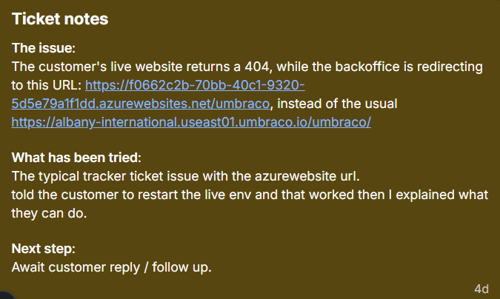
  • What is the issue - a description/resume of the issue together with relevant information like, Cloud project alias, documentation articles, error messages. It is NOT a copy-paste of the first message the customer sent over.

  • What has happened - clear steps followed, explained in a minimal way with links to Slack threads or documentation where applicable. NOT the place where you can write your thoughts

  • Next steps - clearly specify next steps on what the next support has to do in order to continue the ticket. It should always be the last message in a conversation

Important to remember:

1. Watching your grammatical tense is vital, especially when several parties are involved in the solving process.

Make sure to use "The customer" more than you use "they". It is crucial that everyone understands who you are referring to.
When you have BlackOps, CMS team, Fishtank and so on involved in the ticket please use the respective names to address them instead of using "They", "Them" and so on. This will facilitate an easier transition of the ticket to the next person as well as it will avoid any confusion at a later point.

2. Keep the notes short and concise, both for your sake and your teammates. 

3. Always make sure to add Slack threads and documentation links.

4. Have in mind that your notes should also be understood by your coworkers and not only you so write them with this in mind.

5. If the note becomes too long, make sure to take the time to reduce it to only what is relevant at this point and if necessary, have a copy to the selected part you want to refer to.
Nobody wants to read a wall of text just to help a customer with an update.

Example of a good note:

Closing notes should consist of:

  • Issue: - a shorter and clearer explanation of the issue, error message, keywords

  • Solution: - short & clear resolution + future steps if necessary

Imporatnt to remember:

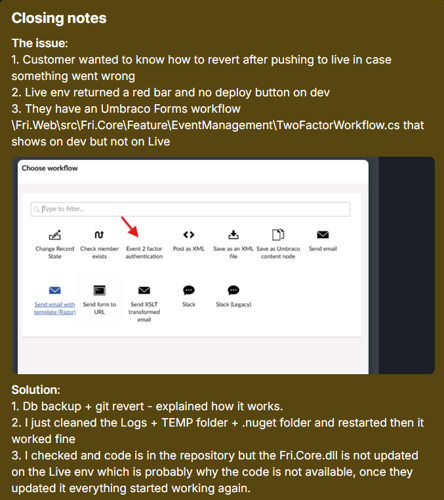
1. If several issues have been handled in the same ticket please make sure to describe all of them using numbers 1,2,3 and the same for the solution using 1,2,3 corresponding for each individual issue.

Like this:


2. Include all links you used to solve the ticket in the solution, it will help the next person and make everyone's experience easier.

3. Avoid copy-pasting answers from BlackOps as a solution unless they are very specific and required; the same goes for avoiding copy-pasting the message you sent to the customer as a solution. 

Results of proper closing notes


Fast, clear, and precise notes create the tools we need to finish tickets in minutes, not hours.

With good notes, we increase our own available tools for the next ticket.

If a good closing note has the error message you are seeing, most likely you can get the answer in 1 minute for the next customer experiencing the same issue.

With both good notes and good closing notes, we increase customer satisfaction drasticaly + reduce the stress and tool support takes on the supporter handling several tickets at the same time.

Lastly, when you take over a ticket, make sure to read the previous notes, understand and simplify them when necessary, and don't just add an endless series of "UPDATE", "UPDATE", "UPDATE" every day and always always add the next step.

Course 2: Ticket handling

Description

This article is about how to increase efficiency while handling tickets.
The main reasons why this is important are:

Quicker solutions >  less stress > higher satisfaction for every customer & supporter

To add more words to this, the quicker you are able to provide something tangible to the customer, the less stress you will have as a supporter, because you can now consider that ticket handled for the time being until the customer comes back. This will increase the satisfaction for the customer because they have something to work with straight from the first message, instead of having to answer a lot of questions that many times we can find the answers to ourselves plus you as a supporter, will have more time to do something else, pick another ticket up, learn something new, or even take a breather.

Now, we're going to go through all the available tools and methods one by one.

Critical reading

Before replying:

  • Read the ticket carefully and identify the core issue

  • Review customer context (plan, organization, projects, country)

  • Check recent page views and conversations

  • Search Intercom and Slack for related keywords or known issues

  • Use available tools to gather as much information as possible

Why is this important, you might ask?
- We have so many tools available that make everyone's life easier
- We'll make the customer feel like you did your homework, went the extra mile 
- Most friction points will be removed because we won't have to wait 30 minutes - 1 hour for the customer to let us know which project, because we already know
- Lastly, customer satisfaction would go through the roof -feeling like you didn't have to do anything, and your issue was resolved, is an amazing thing.

Proper First Response

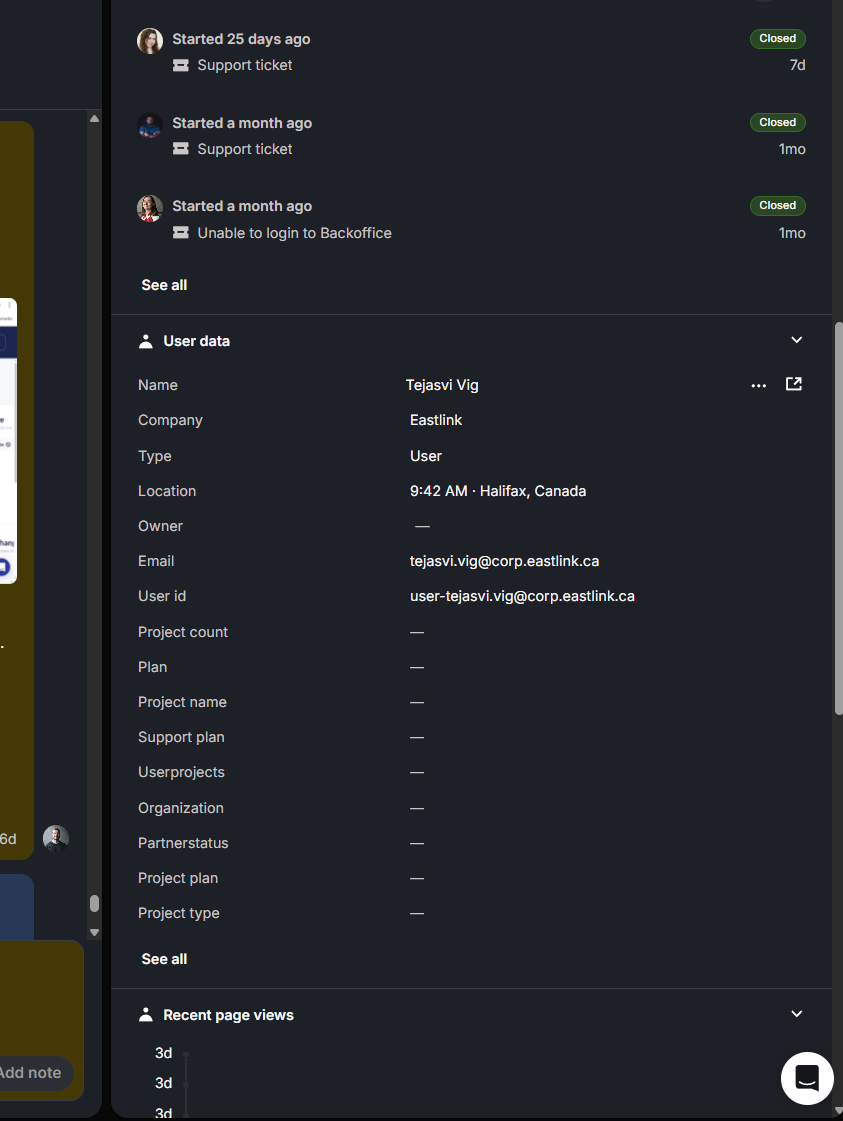
In the intercom sidebar, there is a tremendous amount of information to be found.

  1. Recent conversations.

    • If the customer talks about a previous case with an issue, but doesn't link a ticket number. Check here.

    • If a customer does not explain which project is at hand, you might find it in a previous conversation.

  2. User data.

    • If a customer does not explain which project is at hand, you might find it under Userprojects or using their email in UserFind.

    • Location lets you know where they are based and what the time is. This helps determine the urgency of the ticket.

  3. Recent page views.

    • This gives you a look at where the customer is on Umbraco's site (both Umbraco.com and s1.umbraco.io) and lets you understand what project might be affected.

      Example: 11m ago, customer says site is down, one of the recent page views 11m ago is ProjectA. 
      Safe to assume this is where you should start your investigation.

Intercom sidebar

With the information gathered in the critical reading, put together a full answer for the customer. Things to look out for when making a "proper" answer.

  • The response must acknowledge the issue and the customer if necessary, and preferably include it in the answer.
    Example standalone: "
    I understand you are having a problem with accessing your site. Rest assured I am here to help"
    Example integrated into answer: "
    I can see on your project that you are not an admin, so it makes sense you are having a problem accessing the site."

  • Give the customer something to work with. This means there should ALWAYS be something for the customer to do.
    When you have the information the customer needs, present it and give them something to do, to fix/change the issue.
    If it is only information you are giving, have them acknowledge it. 
    Example: "
    Can you give it a go and do the above?" OR "Please read the above and let me know your thoughts?"

Regular updates

An important part of a ticket, is regular chronological updates. The reason for the importance is:

  • Customer feels included

  • The urgency of the ticket is met

  • Reduces risks of tertiary actors getting involved, such as partner-manager, POs etc

A benefit of updating the customer on current findings from your own investigation, or that og BlackOps/devs, is that it buys you time before they start getting impatient.
From our investigations, most customers feel that the #1 nuisance is not the time spent waiting, but the uncertainty when they are not informed well enough. 

Whenever there is a new answer in a BlackOps ticket, or Slack thread, that has any real advancement in the situation, give it to the customer also. Might not be a resolution quite yet, but a speculation or the like.

The same applies for more urgent cases, take the time to set some expectations. Many times, customers reach out because their issue is urgent (at least in their eyes) and they have someone breathing on their necks asking this to be fixed as soon as possible. 
It will never hurt in these situations to set a time expectation. 
"I completely understand the urgency of this and I can assure you we are doing our best to fix this problem as soon as possible. 
I will make sure to come back with an update:
- Within 2 hours
- At the end of the day
- Before I go home today at 16 CET (include a timezone if possible)
Even if you don't have an actual update or a solution, the customer has something to look forward to.

Support tools

To make it more compact, here is a list of the most used Support tools available for everyone to use:

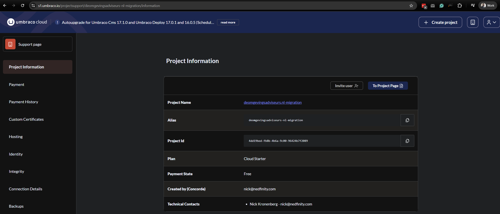
1. /support
This tool provides extra information for each project, and many of the things can be very helpful during an investigation -- finding out versions, checking UmbracoID, getting to the Azure dashboard etc.
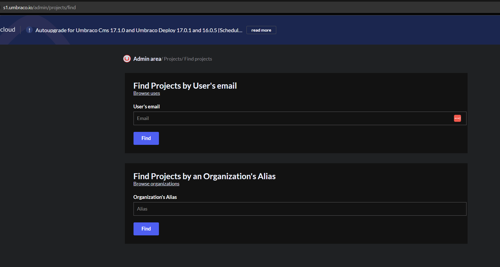
2. Find Site per user email /Find projects for an Organization/User
An amazing way to figure out different information about a customer:
- Are they on Cloud?
- Do they have an UmbracoID account?
- Which project on Cloud are they referring to?

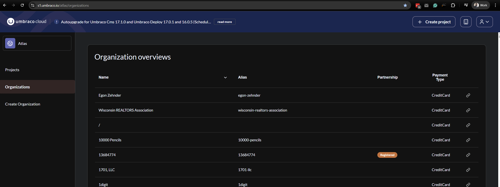
3. Organizations
The perfect place to check organizations on Umbraco Cloud, from creating a new one, to managing the payment type, and managing project ownerships.
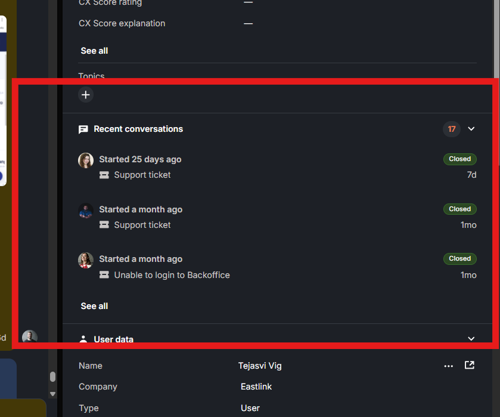
4. Recent conversations
It can provide an overview on previous tickets which can serve as a context to a new ticket the customer just opened. Can also help you predict customer behaviours as well as sometimes tell you which Cloud project they are reaching about.
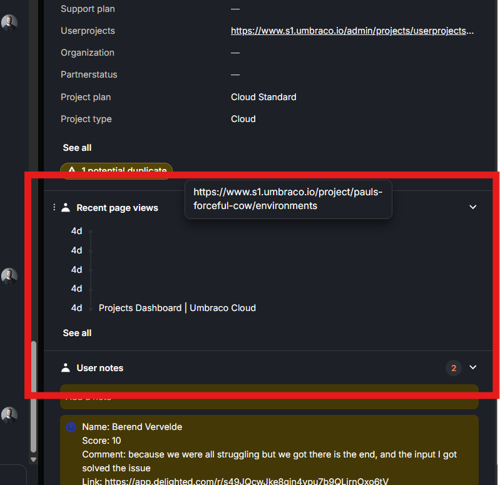
5. Recent page views
One of the most useful tool to help you figure out the alias of the Cloud project the customer is talking about as well as a way to know which page the customer has reached out from.
6. Super-admin access
A hacky way, but a very useful tool to help you get more information about a Cloud project without having access to that specific project also, an efficient way to check project permissions, and lastly, a way to swap an app service plan or move a project to dedicated.

Usually it is your email + [email protected] - here is an example: [email protected] (of course after being granted permission)

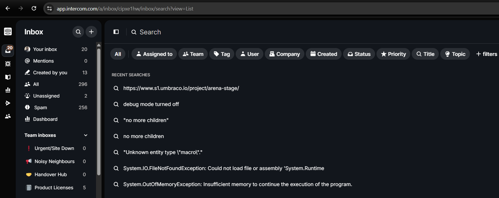
7. Intercom search
Your best friend in finding out solutions to your tickets or at least something to set you in the right direction.
Paste that error message and enjoy a fast resolution.
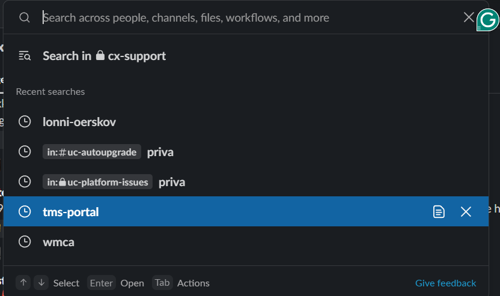
8. Slack search
Your second-best friend when it comes to finding out solutions or information. A very great tool to ask for help as well.
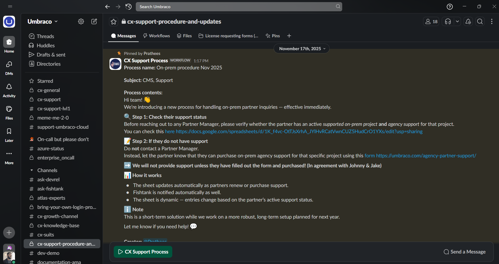
9. Cx-support-procedure-and-updates channel
The best way to learn our procedures as well as a helpful hand in specific situations when step by step actions are required.
10. Knowledgebase
The best tool available to learn the correct ways of support as well as get the guidance in doing your job efficiently.
https://cx-documentation-platform.euwest01.umbraco.io/ 

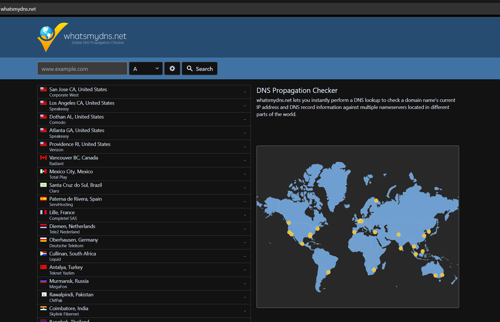
11. DNS checker
Hostname issues? This will be your aid in figuring out the problems and solving the issue quickly.
12. Zoho
Need to learn more about a company? Do they have support or not? Are they eligible for a Code Review or not? Use Zoho to find everything about it.

13. Ask a colleague
The best method to get help if you're stuck. Use it always without fear!
Escalation best practices

It is always a difficult decision to escalate a ticket to BlackOps / second-level support or a different team at times when the customer wants a solution as fast as possible, and we want to help.

So the question is, When? When do we escalate? & What? What do we escalate?

Here are some guidelines to follow when you are not sure when to escalate this:

  1. Is this a known issue?

  • Sometimes, there are Cloud changes made that break projects, which only second-level support can fix

  • You have found Intercom tickets or Slack threads describing the exact issue and the only ones who have acess to fix is BlackOps

  • Maybe you have seen it in the past and you know there's not much you can do

  1. Have you really tried everything?

  • Have you tried locally?

  • Have you inspected the Kudu Logs, Azure and Cloudflare? 

  • Have you searched Intercom / Slack?

  • Have you asked someone sitting next to you what they think? 

Of course, all of this is relative and depends on the situation, the customer, and the urgency of the issue, but as a rule of thumb, try different perspectives before escalating a ticket to the next level or team.

Very important: if you have tried to figure it out already for quite some time (let's say, a maximum of 1 full hour) and there's nothing to work with, it is safe to assume it's beyond the current knowledge/access and it's best to get some help. This helps you get a faster solution and have a happy customer faster + a great opportunity to learn in case you missed something obvious.

Course 3: Dos and Don'ts

Warning

This entire course is an open discussion. These are points we see and feel strongly about. You are more than welcome to come and talk to us if you disagree with anything in this article - SRG & OBK

Do

Confidence

Trusting our own answers is one of the most important things when being on the "expert" side of a support case.
Customers reach out for help, so if our answers, or even just the tone, is uncertain, it creates a lack of trust in our ability to help them.

  • Use clear direct language that shows you are telling what to do, or how things work, not guessing.

    • Avoid words like, maybe, probably, should work and use will work. (Not always applicable, but just keep it in mind)

  • Backing up your answers with documentation so they can see a centralized place where you are getting the information.

Call to action

CTA or call to action is a clear communication from you to the customer that they need to do something. The main purpose of CTA is that the ticket doesn't go cold.

  • Direct order:

    • "Can you please do the changes I listed?"

    • "Can you let me know if it works now?"

  • Sanity check:

    • "Please consider the above and let me know your thoughts"

    • "Let me know if you have any further questions or if you are good to go from here"

Properly research a ticket

Use the tools from RISE 2, make sure you have squeezed the ticket for all the information possible.

Ask a colleague

Once you are confident that the above has been done, and you do not know the answer nor have the ability to find it at this moment, you can and should ask a colleague for help.

We are all here to help each other, and you might get a "idk 🤷🏼‍♀️" or the answer right then and there.

Regular updates to customer

As discussed in RISE 2, the point of updating the customer is to make them feel included, which will result in two things:

  • Longer available time before uneasiness settles in, as they feel you are on top of the situation.

  • Better overall experience for the customer, leading to better NPS.

MAKE GOOD NOTES

Good notes are the bread and butter of our collaborative work. One good note could save you or a colleague HOURS down the road.

For good measure, just read the entirety of RISE 1 again. This is so essential for our team work.

  • Every good ticket note will lead to much easier handovers if you are sick etc. 

  • Every single good closing note will "add an answer" to our arsenal. We will be able to search for it and save countless hours as this will stay in our system (I just had a case yesterday where the answer was in a note from 9 years ago)

Setting expectations and common understanding

With some new initiatives, like Red, yellow & green ticket status and 5 day summary follow-ups, we will need to focus on customer alignment.

Too often have we seen customers angry because they feel like we are doing nothing, when we are waiting on them or waiting on devs, and they are not fully aligned with why we (support) are not doing anything.

  • Much like the Regular Updates, this buys time from the customer when they know we are actively working at it.

  • Should the hammer fall and PO, partnermanager etc is involved, they will have no option but to admit we are aligned. At least on paper.

Understanding where we are looking

Before answering anything(unless super easy), be sure that you know exactly where this environment is located. Cloud, Heartcore or On-prem with support.
Instead of spending energy trying to help someone with their issue, only later to find out it is on-prem, with no support, when asking for an invite. In this case, how can you pull out? "Oh sorry, I helped you for 2 hours, but now I will just stop". 

Unexplained responses

Often we know what we are talking about, or have seen the issue 100 times before, so we just give the answer to the customer. This can often feel like we are just throwing things at customers. Make sure to properly explain what and why.

  • Customers' trust in your answer will go up if you explain what/why you or they have to do as such.

  • Using documentation to back up the answer will let them go back to it if they are not fully aligned.

Ignoring customer feelings

As much as I (OBK) hate it, you have to invoke your (sometimes hidden) pathos.
Customers often express their frustrations and feelings, sometimes explosively, other times more subtly.

  • Frustration is a part of support, they reach out to us when it's already burning. Show understanding for the situation. Acknowledge that we are here to help without making it seem like you are their therapist.

  • We are the "friendly" cms, so it is sometimes a little unprofessional. Just like it is fun and chill in the support, we also need to be able to handle unprofessionalism when it is in the negative spectrum.

Pick-up to answer time

A key point of RISE 2, is Critical Reading. Getting as much information as possible to give a loaded, good first response. This means, when done properly, it will take a little longer before you answer the ticket. 

  • Do NOT pick up a ticket if you are going to just have it laying while you do other stuff.

  • All attention should go to your new ticket between pick-up till first response is sent.

Robot language

As the "friendly" CMS, customers have, over the yeras, come to expect a certain tone from us. We are friendly, helpful while still a certain professionalism.

Nothing makes a customer squirm like reading an answer from a supporter that might as well be written by Umboto.

  • Use warm, human and approchable language.

  • Don’t just copy paste their inquiry prefixed with “I understand that[...]” Show that you understand the issue, without just saying what they said.

Tips to add

  • Never be afraid to take a step back. You can always realign on the issue or status of a ticket.

  • Angry or impatient customer -> acknowledge. Show understanding for their frustration of the situation.

  • Don’t be afraid of sending long messages. This is almost encouraged, as they will have a lot to work with.

  • They are here for help, they need to feel like you are providing help, not ideas. Be stern in your answer and proactive.


Tip

Please leave your thought below if you have something to add to the two categories

Do's

Let us know what things you would feel is welcome in the Do's section